Internet TV in 2026: how to choose well and pay less
A practical guide to internet TV in the UK in 2026: how streaming costs build up, what broadband speed you need and simple ways to cut your monthly bill.
What internet TV is and why so many households use it
Internet TV is now one of the usual ways people in the UK watch series, films, sport and live channels. Instead of relying on an aerial, satellite dish or traditional set-top box, the content reaches you through your broadband or mobile data connection, and you can watch it on a smart TV, phone, tablet or computer. That gives you a lot of flexibility, but the bill can creep up year after year if you don't choose carefully.
There are two main types of service:
- On-demand streaming platforms, which focus on catalogues of series and films.
- Live TV and sport services, which combine live channels and sports coverage.
Many households end up paying for a mix of both, and that is usually where costs rise. Always use legal services: unofficial IPTV streams are illegal, can be unsafe for your devices and data, and may lead to penalties.
It is also worth checking whether you need a TV Licence. In the UK, a licence is generally required if you watch or record programmes as they are broadcast live on any channel or service, or use the BBC's on-demand service, regardless of the device you use.
What internet TV costs: the two parts of the bill
When you add up the cost of internet TV, think of it in two parts.
- Subscriptions. Most streaming platforms offer several tiers, typically a lower-priced plan with adverts, a standard plan and a premium plan with 4K picture and more simultaneous screens. Prices change regularly, so check each provider's current price list before signing up.
- The connection. Streaming depends on reliable broadband. Without it, even the most expensive subscription will buffer or drop in quality.
A simple exercise helps: list every subscription you pay for, add your monthly broadband price, and multiply by twelve. Many households are surprised by the annual total, especially once a sport service is included.
What broadband speed you need for streaming
The right speed depends on how many people stream at once and in what quality. As a rough guide, based on offers available at the time of writing:
- One or two people, mostly HD on one screen. An entry-level fibre plan may be enough, such as NOW Broadband's Fab Fibre (36 Mb) at £19/mo.
- Small households with a few devices. A full fibre plan around 100 Mb gives more headroom, for example TalkTalk Full Fibre 100 at £22/mo or Shell Energy Full Fibre 100 at £24.99/mo. Virgin Media M125 (132 Mb) at £27/mo and BT Full Fibre 1 (150 Mb) at £29.99/mo sit in a similar range.
- Busy households streaming 4K on several screens. Faster plans make more sense here, such as Virgin Media M250 (264 Mb) at £31/mo, Plusnet Full Fibre 500 at £27.99/mo, Vodafone's 500 plan at £28/month or Sky Ultrafast Plus (500 Mb) at £32/mo.
- Very heavy use or home working alongside streaming. EE lists plans including EE 900Mbps at £24/mo and EE Full Fibre 900 at £39/mo.
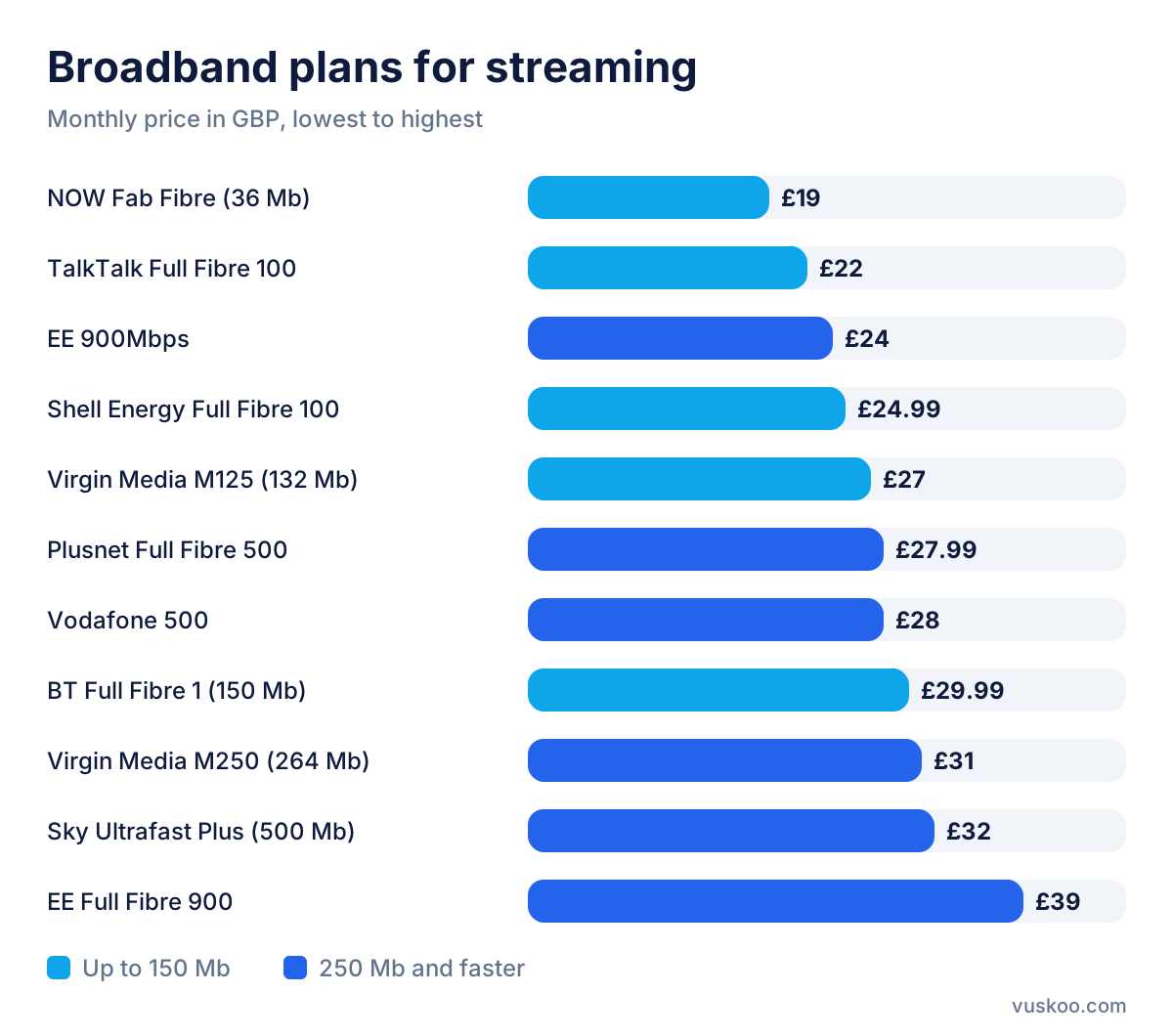
Faster does not always mean more expensive: some higher-speed plans cost less than slower ones, so compare speed and price together. Availability also depends on your address, so check which of these plans can actually be installed at your home before comparing prices.
Streaming on mobile data
If you watch a lot on your phone away from home, video can use up a data allowance quickly. An unlimited SIM-only plan avoids surprises, for example Voxi Unlimited at £15/mo, SMARTY Unlimited at £16/mo or Three Unlimited at £18/mo. If you mainly stream over Wi-Fi, a plan with a fixed allowance, such as iD Mobile 100 GB at £12/mo or O2 100 GB at £15/mo, may be enough.
How to choose internet TV without overpaying
Before you sign up, spend five minutes on these checks:
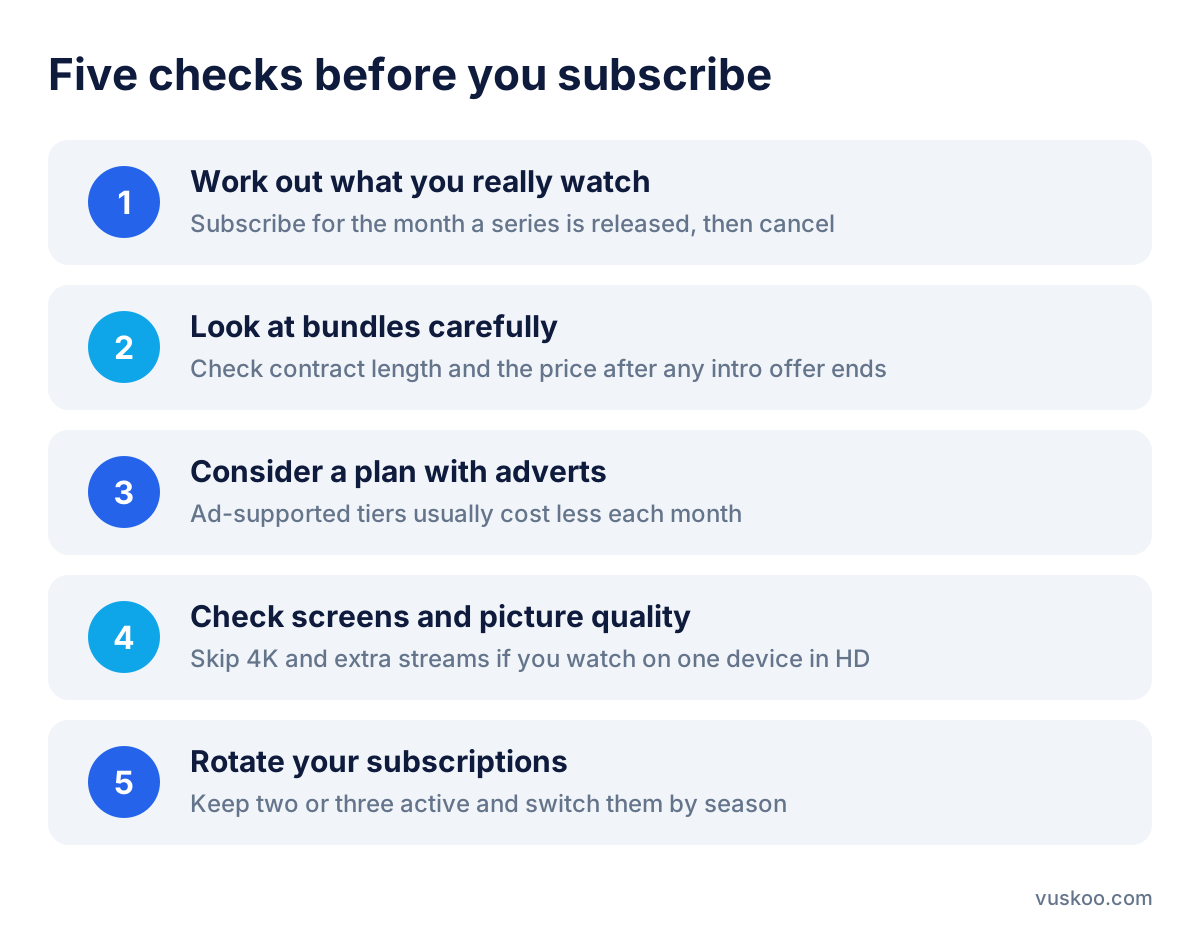
- Work out what you really watch. If you only want one particular series, subscribe for the month it is released and cancel afterwards. Many streaming services allow monthly cancellation, but check the terms first.
- Look at bundles carefully. Some broadband providers include TV channels or streaming subscriptions in their packages. Compare the bundle price with what you would pay separately, and check the contract length and what happens to the price when any introductory offer ends.
- Consider a plan with adverts. If ad breaks don't bother you, an ad-supported tier usually costs less each month, and the saving adds up over a year.
- Check screens and picture quality. Don't pay for 4K and several simultaneous streams if you watch on one device in HD; a mid-range plan is often enough.
- Rotate your subscriptions. Keep two or three services active at a time and switch them by season, rather than paying for all of them all year.
Mistakes that push your bill up
- Forgetting about subscriptions you hardly use. Review your bank statements every few months and cancel anything you no longer watch.
- Paying for extras you don't need. Extra members or add-ons are sometimes unnecessary when reorganising profiles within your household would do.
- Not comparing. The same content and connection can cost very different amounts depending on the provider, the plan and the offers available at the time.
Compare internet TV and broadband options on Vuskoo
Choosing the right internet TV setup depends on your viewing habits and budget, and prices and offers change every few months. On Vuskoo you can compare broadband and mobile plans side by side, filter by what matters to you and find a combination that lets you enjoy your entertainment without paying more than you need to. Before you sign up or renew, compare your options on Vuskoo and decide with up-to-date information.
← Back to blog
Subscribe to our newsletter
The best deals and money-saving tips, straight to your inbox. No spam.