In this article
An Economy 7 tariff is an electricity tariff with two unit rates: a cheaper night rate for seven hours, usually some time between late evening and early morning, and a higher day rate for the other 17 hours. It can save money if a large share of your electricity is used overnight, for example to charge storage heaters, heat a hot water cylinder or charge an electric car. If most of your use is during the day, a single-rate tariff usually costs less.
This guide explains how the day and night rates work, how to find your off-peak hours, how to work out your break-even point, and how Economy 7 compares with newer smart time-of-use tariffs.
How does an Economy 7 tariff work?
Economy 7 needs a meter that records day and night use separately. This can be an older two-rate meter with two registers or a smart meter set up for Economy 7. Your supplier then bills each register at its own unit rate, plus a daily standing charge.
The idea dates from a time when demand on the grid fell sharply at night. Suppliers offered cheaper overnight electricity to encourage households to shift use, mainly through storage heaters that take in heat at night and release it during the day.
Three things decide whether it works out for you:
- The gap between the day and night rates. The wider the gap, the more you gain from each unit used at night.
- The day rate compared with a single-rate tariff. The day rate on Economy 7 is normally higher than a standard single rate, so every unit used during the day costs you extra.
- Your night share. The proportion of your total electricity that falls inside the off-peak window.
How do I find my Economy 7 off-peak hours?
The seven off-peak hours are not the same for everyone. They depend on your region and your meter, and some meters split the cheap period into two blocks. A window from around midnight to 7am is common, but yours may be different.
- Check your bill, online account or app. Many suppliers show your off-peak times alongside your rates.
- Look at your meter or in-home display. A smart meter display usually shows day and night readings separately. On a two-rate meter, note which register goes up overnight.
- Ask your supplier. This is the most reliable option, especially if you moved into a home with an existing meter.
- Check for summer time changes. On some older meters the off-peak period does not move with the clocks, so in British Summer Time it runs an hour later by the clock.
Once you know your times, set timers on storage heaters, immersion heaters, dishwashers, washing machines and EV chargers to run inside that window.
What about older radio-controlled meters?
Some older Economy 7 and similar multi-rate meters switched between rates using a long-wave radio signal called the Radio Teleswitch Service (RTS). That service has been phased out, with Ofgem confirming the switch-off in 2026. If you still have an old meter of this type, contact your supplier about a replacement so your heating and hot water switch on at the right times. A replacement smart meter can still run an Economy 7 tariff.
How much of your electricity needs to be at night to save money?
A common rule of thumb, used in National Energy Action guidance, is that Economy 7 tends to pay off once around 40% or more of your electricity is used during the off-peak hours. The exact figure for you depends on the rates you are comparing, so it is worth working it out.
Working out your break-even point
- Find your night share. Add up a year of night readings and divide by your total use (day plus night). Your annual statement or app should show both.
- Get three unit rates: the Economy 7 day rate, the Economy 7 night rate and the single rate on the tariff you are comparing it with.
- Calculate the break-even night share: (day rate − single rate) ÷ (day rate − night rate). The result is the proportion of use that needs to be at night for the two tariffs to cost the same on unit rates.
- Compare. If your actual night share is above the break-even figure, Economy 7 should cost less on units. If it is below, the single-rate tariff should cost less.
- Add the standing charges. Multiply each daily standing charge by 365 and add it to the yearly unit cost before making a final decision.
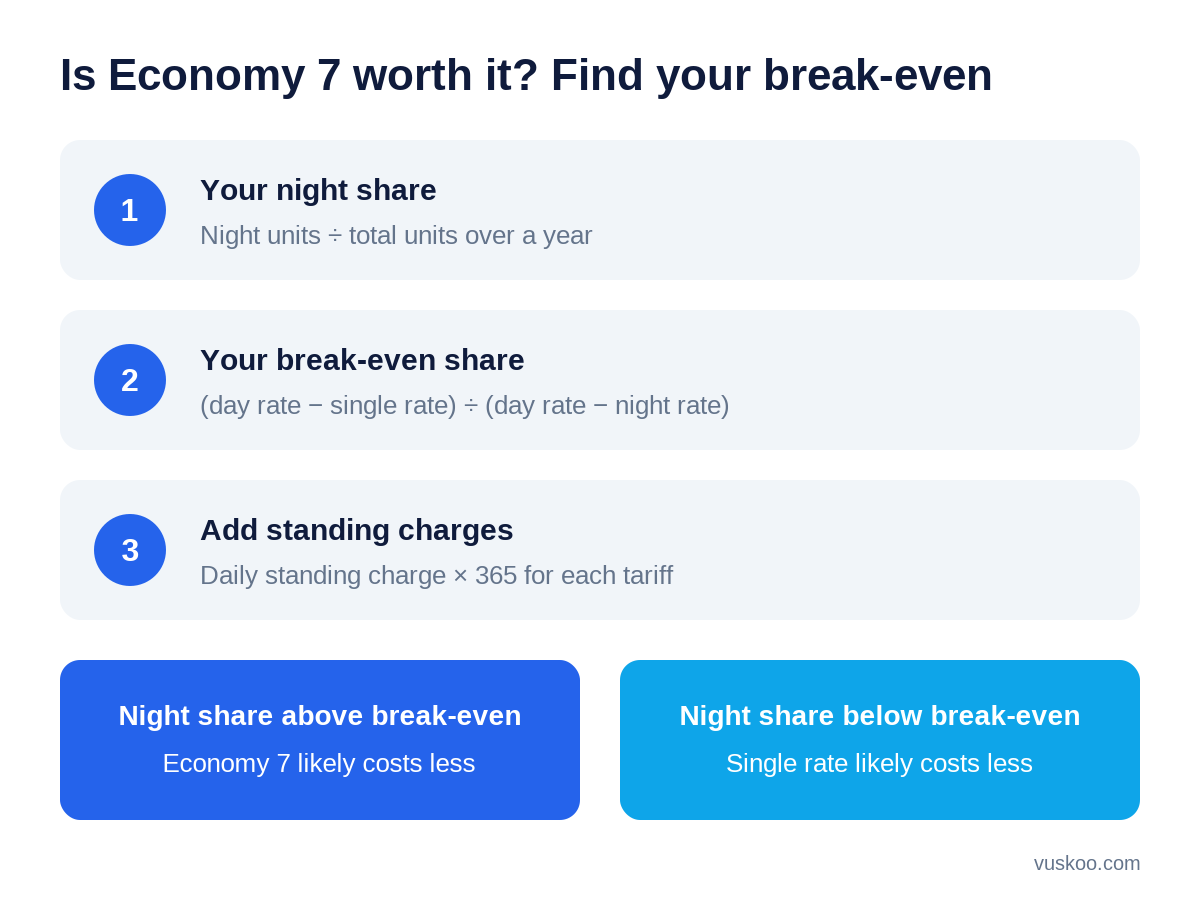
A quick sense check: if the day rate is only slightly higher than the single rate, the break-even share is low and Economy 7 is easier to justify. If the day rate is much higher, you need a large night share to come out ahead.
Who is an Economy 7 tariff suited to?
- Homes with storage heaters that charge overnight and are the main source of heating.
- Homes with an electric hot water cylinder heated by an immersion heater on a timer.
- Electric vehicle owners who charge at home overnight, since a car battery can make up a large share of total use.
- Households that can move flexible loads, such as laundry and dishwashing, into the night window.
It is less likely to suit homes with gas central heating and modest electricity use, people who work from home and use electric heaters during the day, or anyone who cannot easily run appliances at night.
Economy 7 compared with smart time-of-use tariffs
With a smart meter, suppliers can offer tariffs that go beyond a fixed seven-hour window. These fall into a few broad types:
- Fixed time-of-use tariffs with set cheap and peak periods, sometimes with more than two rates.
- EV tariffs with a cheap overnight window aimed at car charging, such as E.ON Next Drive Smart. Some apply the cheap rate to the whole home and others only to the charger, so check the terms.
- Smart tariffs that use half-hourly readings, such as the EDF Smart Tariff, where the terms set out when cheaper rates apply.
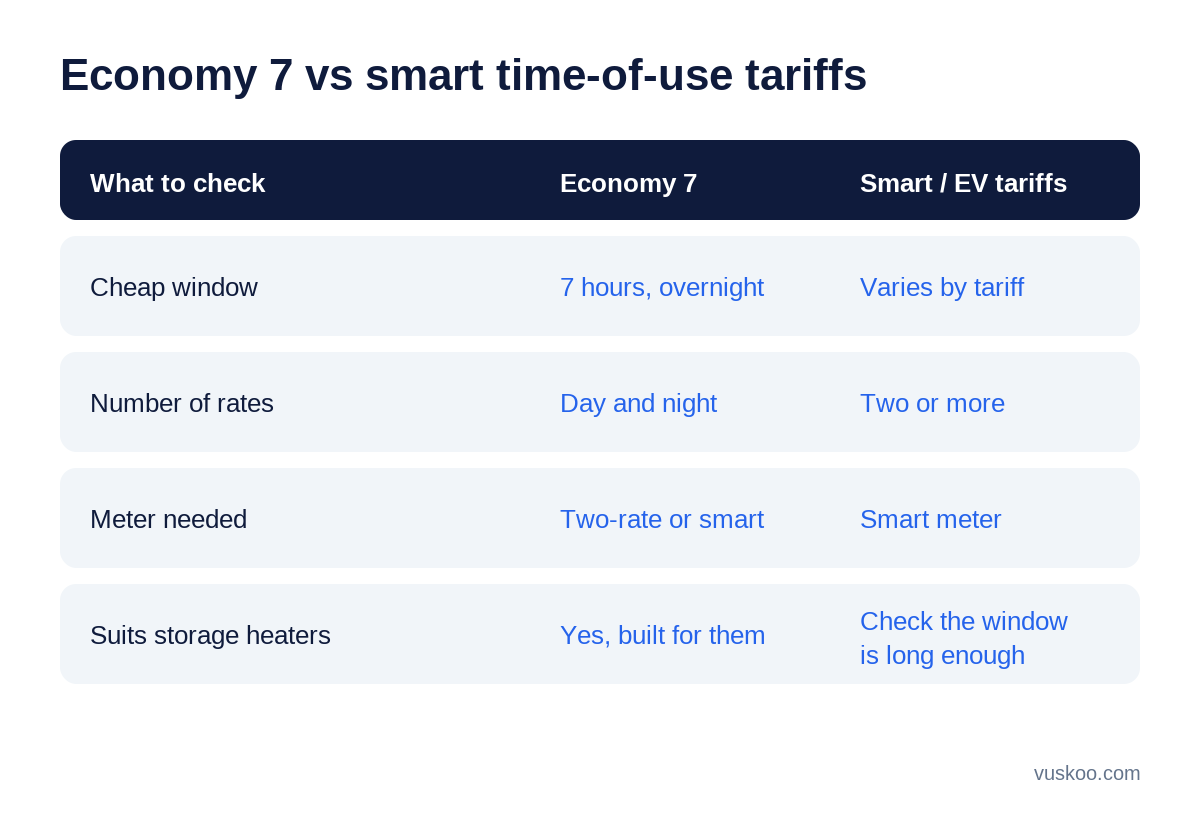
The key differences are the length and timing of the cheap window, whether there is a pricier peak period (often late afternoon and early evening), and whether you need specific equipment such as a smart meter or a compatible EV charger. If you have storage heaters that need seven hours of charging, a shorter cheap window may not keep your home warm enough, so check how long the off-peak period lasts before switching.
What to compare when choosing an Economy 7 deal
- Day and night unit rates, and the gap between them.
- Standing charge, which you pay whatever you use.
- Fixed or variable. A fixed deal, such as Octopus 12M Fixed or E.ON Next Fixed 12-Month, holds rates for the term. A variable tariff, such as British Gas Standard Variable or Flexible Octopus, can change, usually in line with the Ofgem price cap. Check whether the deal you are looking at has an Economy 7 version.
- Exit fees on fixed deals, and what happens to your rates when the fix ends.
- Payment method. Prepayment tariffs, such as Utilita Pay As You Go, can be priced differently from direct debit.
- Off-peak hours on the new meter or tariff, in case they change after a switch.
Use your own annual day and night readings when comparing, not an average estimate. The live offer boxes on this page show current rates.
Frequently asked questions
Can I switch off Economy 7?
Yes. You can ask your supplier to move you to a single-rate tariff. With a smart meter this is usually a remote change. With an older two-rate meter, some suppliers keep the meter and bill both registers at the same rate, while others may replace it.
Is Economy 7 the same as Economy 10?
No. Economy 10 gives ten cheaper hours, usually split between night, afternoon and evening. It is less widely available and needs a compatible meter.
Do I need a smart meter for Economy 7?
Not necessarily. A two-rate meter can run Economy 7. But most newer time-of-use and EV tariffs need a smart meter that sends half-hourly readings.
Does Economy 7 work with gas?
Economy 7 applies only to electricity. If you have gas as well, the gas part of your bill is charged as normal.
Why is my bill higher on Economy 7?
Usually because too much of your use happens during the day at the higher rate. Check your timers, make sure your off-peak hours are correct, and calculate your night share to see whether a single-rate tariff would suit you better.
Photo: user32212 / Pixabay