
How do you run a broadband speed test you can trust?
To get a broadband speed test result you can rely on, plug a computer into your router with an Ethernet cable, close any other apps and devices that use the internet, and run the test a few times at different times of day. Write down the download speed, upload speed and ping each time. Then compare the figures with the minimum guaranteed download speed your provider gave you when you signed up. If you are regularly below that figure, you may be able to ask for a fix and, if it isn't fixed, leave your contract without paying a penalty.
Below we cover why a single test on your phone can mislead you, which numbers matter, and what to do step by step if your connection really is slow.
Why a quick test on Wi-Fi is often misleading
Most people test on their phone, in whatever room they happen to be in. That measures your Wi-Fi as much as your broadband. Walls, distance from the router, interference from neighbouring networks and the age of your device can all cut the result, even when the line coming into your home is working properly.
A wired test removes most of those variables. It shows what your provider is actually delivering to the router, which is what your speed guarantee covers. If the wired result is fine but Wi-Fi is poor, the fix is usually inside your home rather than with your provider.
Steps for a reliable test
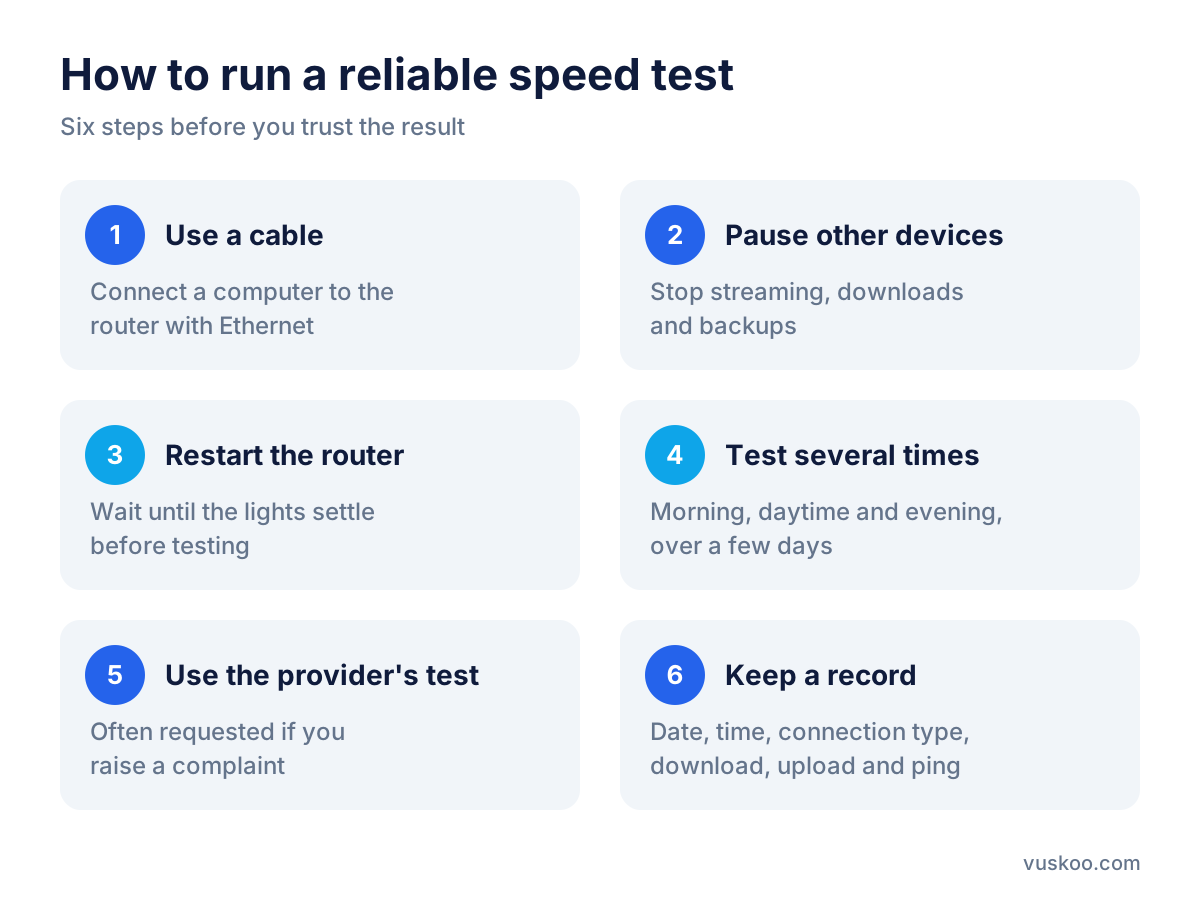
- Use a cable. Connect a laptop or desktop to the router with an Ethernet cable. Laptops without a port can use a USB adapter.
- Pause everything else. Stop streaming, downloads, game updates, cloud backups and video calls on other devices, or disconnect them.
- Restart the router first. Leave it off for a minute, turn it on and wait until all the lights settle.
- Test several times. Run the test in the morning, during the day and in the evening, over a few days. Evening peak hours are when networks are busiest.
- Use the provider's own test as well. If you later raise a complaint, providers usually ask for results from their own speed checker or from their own line diagnostics.
- Keep a record. Take screenshots or note the date, time, connection type and results.
Which figures in a speed test matter?
A typical speed test shows three numbers:
- Download speed (in Mbps): how fast data reaches you. It affects streaming, browsing and downloading files. This is the figure your minimum guarantee normally refers to.
- Upload speed (in Mbps): how fast you send data. It matters for video calls, sending large files, cloud backups and live streaming.
- Ping or latency (in milliseconds): how quickly your connection responds. Lower is better, and it matters most for online gaming and calls.
Watch the units. Broadband is sold in megabits per second (Mbps), while download managers often show megabytes per second (MB/s). One byte is eight bits, so a file downloading at a given number of MB/s is using eight times that number in Mbps.
How to compare your result with what your provider promised
When you take out a broadband contract with a provider that has signed up to Ofcom's voluntary broadband speeds code of practice, you should be given speed information before you commit. This includes an estimate of the speed you are likely to get, often shown as a range, and a minimum guaranteed download speed for your line. You will usually find these in your contract summary, welcome email or online account.
Keep three ideas apart:
- Advertised or headline speed: the name of the package, such as a 100, 500 or 900 Mb tier. It is not a promise for your specific home.
- Estimated speed for your line: what the provider expects you to get, based on your address and technology.
- Minimum guaranteed speed: the threshold that matters for your rights under the code.
Getting less than the headline speed is common, especially on older copper-based connections where distance from the cabinet affects performance. Getting consistently less than your guaranteed minimum on a wired test is the point at which you have a case.
Your broadband is slow: what to try first at home
Before contacting your provider, rule out problems on your side. It saves time and providers will usually ask you to do these checks anyway.
- Move the router. Place it in a central, raised position, away from thick walls, mirrors, fish tanks and other electronics. Avoid hiding it in a cupboard.
- Check the cables and socket. On a copper line, plug the router into the main phone socket (often the test socket behind the faceplate) and remove extension leads.
- Update devices. Older laptops and phones may not support newer Wi-Fi standards and can limit speed.
- Use the right Wi-Fi band. Many routers offer a faster band for short distances and a slower one with longer range.
- Extend coverage. For larger homes, a mesh system or Wi-Fi booster can help in rooms far from the router. Some providers include or sell these.
- Check for heavy users. Several people streaming in high quality at once can make the connection feel slow even when it is working as sold.
Complaining under Ofcom's broadband speed code
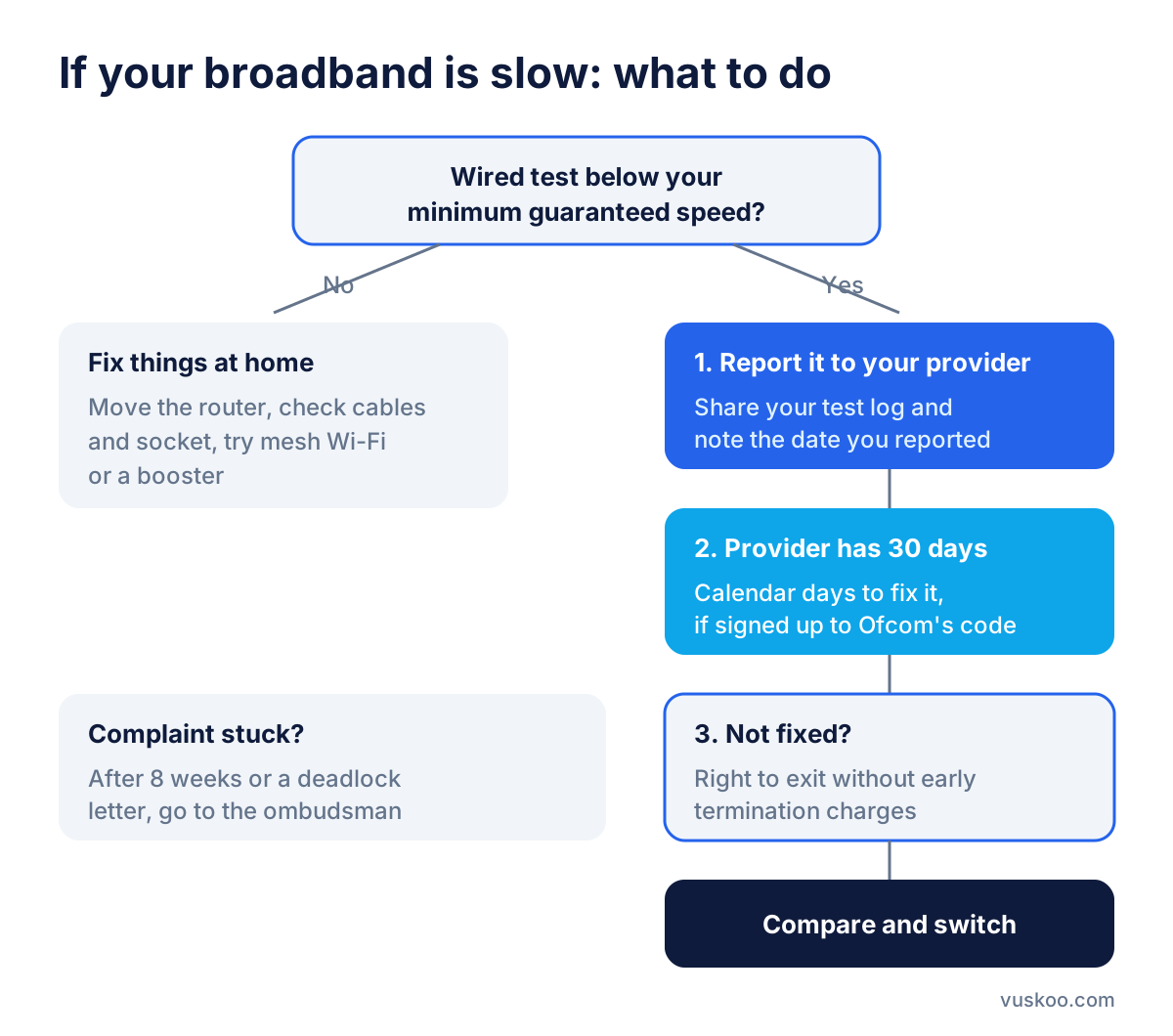
If wired tests still show speeds below your guaranteed minimum, contact your provider and report it. Under the code, signatory providers must try to fix the problem. If they cannot bring your speed back above the minimum within 30 calendar days of being told, and the problem is within their network, you should be allowed to leave your contract without early termination charges. This also applies to bundles that include phone or TV alongside broadband.
Many of the largest providers have signed up to the code, including BT, EE, Sky, TalkTalk, Virgin Media and Vodafone. Ofcom keeps the current list of signatories on its website, so check it if you are unsure about your provider.
How to make the complaint stronger
- Share your log of wired test results, with dates and times.
- Quote your minimum guaranteed speed and where it is written.
- Note the date you first reported the problem, as the 30 days run from then.
- Keep reference numbers for every call or chat.
If your provider doesn't resolve your complaint, you can ask for a "deadlock" letter, or wait eight weeks from your first complaint. You can then take it to the independent ombudsman scheme your provider belongs to, which is free for customers.
Leaving your contract or switching provider
If you have the right to exit, or your contract is ending anyway, it is worth comparing what else is available at your address. Before you pick a new deal, look at:
- Technology at your address: full fibre, cable or part-fibre. Full fibre is less affected by distance than copper lines.
- The minimum guaranteed speed the new provider offers for your line, not only the headline tier.
- Upload speed, if you work from home or back up a lot of files.
- Price after any introductory period and how mid-contract price rises are set out in the terms.
- Contract length and what is included, such as the router or Wi-Fi extenders.
In most cases the new provider arranges the switch for you, so you don't need to contact your old provider to cancel. The offer boxes next to this article show current deals from providers such as BT, EE, Sky, Virgin Media, Vodafone, TalkTalk, Plusnet, NOW Broadband and Shell Energy, so you can compare speeds and prices side by side.
Frequently asked questions
What is a good result in a broadband speed test?
It depends on what you pay for and how you use the connection. The fairest benchmark is the estimated and minimum guaranteed speed for your line, rather than a general figure.
Why is my speed lower in the evening?
Evenings are peak hours, when many households are online at once. Some slowdown can be normal, but if wired tests regularly fall below your guaranteed minimum, report it.
Does a test on my mobile phone count for a complaint?
It can show there's a problem, but providers usually want wired tests or their own diagnostics, because Wi-Fi results depend on factors outside their network.
Can I leave my contract just because my speed is below the headline figure?
Not usually. The right to exit under Ofcom's code is linked to the minimum guaranteed speed, and only applies if your provider has signed the code and fails to fix the problem within 30 days.
Does the code apply to mobile SIM-only plans?
No. The broadband speeds code covers fixed home broadband, not mobile data plans.
Photo: StartupStockPhotos / Pixabay